

“It takes me about an hour to upload 4 supplier price lists – each with several hundred products. This includes some maintenance to drop some discontinued lines. This updates not only purchase prices but all core sell prices and contract prices (except for some that are flagged not to change as lock in contracts).
Could not live without it. Singularly the tool that controls our margins with minimal effort”
– Kathy W, Whitehouse cleaning equipment and Supplies
IN SHORT: What This Means for Your Business
By using supplier price list uploads, effective dates, and the new pricing parameters, you can:
- Protect margin by controlling when and how sell prices are recalculated.
- Eliminate time spent checking supplier invoices or correcting outdated prices.
- Keep purchase costs and sell prices aligned with supplier changes protecting your margins.
- Streamline new product setup using supplier data already at hand.
Supplier price changes now arrive more frequently and with less notice, and the impact on margin can be significant if they are not controlled carefully.
In the current business climate of fuel peaks and flow on effects of freight costs being passed on by product price increases to your business the management of these price changes must be quick and accurate – both from changes to purchase costs and sell prices also protecting your margin.
Many businesses spend too much time checking supplier invoices, manually updating purchase prices, fixing quotes and sales orders, or advising customers after an increase—often forfeiting margin in the process. You shouldn’t be doing any of these manually.
Infoware provides the tools to keep supplier prices accurate, protect your margin, automatically recalculate sell prices when costs change, and significantly reduce admin time. We’ve recently refined some key features to make managing supplier price lists even easier:
- Archive all non active products so if added at a future date then purchase price is recalled online.
- Make a fail safe to find any missed products rather than rely on plugins
- Infoware now includes an option that allows you to always update the purchase cost from a price list while only recalculating sell prices and landed cost when a purchase price increases. This ensures that when costs decrease, your current market-accepted sell price remains unchanged, allowing you to capture additional margin.
- Also an option to quarantine updating sell prices to a quarterly or biannual basis
Table of Contents:
- How Supplier Price Lists Work with Infoware
- Controlling Sell Prices and Margin
- Using Effective Dates to Control When Prices Apply
- Managing Exceptions and Run‑Out Items
- Faster Product Creation from Supplier Data
- What This Means for Your Business
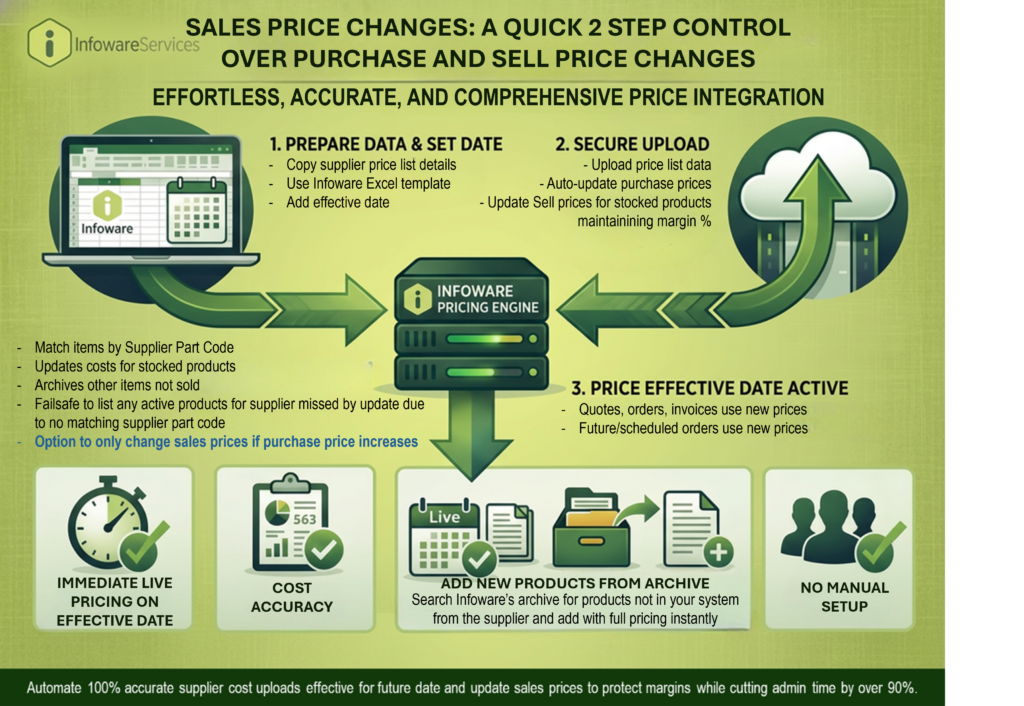
1. How Supplier Price Lists Work with Infoware
Each product in Infoware is linked to a supplier via the supplier’s part code. This code allows Infoware to match items in a supplier’s price list with the corresponding products in your system.
When you receive an updated price list from a supplier, simply copy it into Infoware’s Excel supplier price list template and upload it directly. Infoware then updates purchasing details for all matched products via the supplier part code; plus, automatically archives the remaining products from the supplier’s range for future retrieval —helping you stay prepared if new products are later added rather than having to go looking externally for the purchase prices.
These are uploaded with a future effective date so all prices lists can be loaded in advance and will apply immediately on effective date.
2. Controlling Sell Prices and Margin
Infoware supports up to five base sell price levels per product, each calculated from standard cost using remembering preferred mark‑ups. When a supplier’s price list updates the cost, the linked sell prices can automatically recalculate to maintain your margins.
Contract prices set for specific customers or groups can also update automatically unless flagged to remain fixed as of the effective date.
Recognising that not every business wants automatic recalculation of sell prices when purchase prices DECREASE, Infoware now includes a new site parameter that allows you to always update the purchase cost from a price list while only recalculating sell prices and landed cost when a purchase price increases. This ensures that when costs decrease, your current market-accepted sell price remains unchanged, allowing you to capture additional margin.
Additionally, there is now flexibility at upload time to prevent automatic sell price changes entirely for selected uploads now or later. This is ideal for managing (depends on your market) whether supplier price changes passed on immediately or quarantined and changed quarterly or biannual basis
3. Using Effective Dates to Control When Prices Apply
Every supplier price list upload includes an effective date, which determines when Infoware begins using the new cost on purchase orders and the new sell prices on quotes and customer orders.
If an order is entered for a date on or after the effective date, Infoware automatically applies the updated pricing. This ensures forward‑dated quotes and orders always use the correct cost and sell price (providing the supplier price lists are uploaded) – eliminating manual checking or intervention.
4. Managing Exceptions and Run‑Out Items
Occasionally, supplier part codes may change or be retired, or you may decide not to continue selling a particular product. When Infoware uploads a price list, it automatically reports any items that could not be updated due to mismatched or obsolete supplier part codes.
For clients who use a plugin that identifies existing products missed from supplier updates, Infoware now replaces the plugin as now lists active products that were missed from the update, excluding “run‑out” and “obsolete” products. This provides a failsafe to ensure no products are missed due to invalid part codes.
You can then correct the supplier part code as a run‑out/end‑of‑life product before repeating the upload (if active product(s)).
5. Faster Product Creation using last Supplier price list Data
Infoware also archives supplier items not currently set up as products during each upload. This means that if you later choose to add an item not previously stocked, the last recorded supplier pricing is used —without searching for old spreadsheets or contacting your supplier
When adding a new product in Infoware Services, entering a supplier part code that already exists in the archive (from past price list uploads) automatically populates key purchasing details. You can then enter sell prices or margins (manually or via predefined product group margin rules), assign the product to the appropriate groups and web categories, and make it immediately available for quoting, purchasing, and ecommerce. This removes time to have to externally chase the purchase price for any new products as saved / updated on each supplier price list upload.
6. What This Means For Your Business
With Infoware’s enhanced supplier price list management, your business gains tighter control over pricing, margins, and administrative workload—without increasing complexity.
- Protect your margins by ensuring sell prices respond appropriately to cost increases while retaining gains when costs decrease.
- Reduce manual effort by eliminating the need to check supplier invoices, adjust pricing, or correct outdated quotes and orders.
- Improve accuracy and confidence with automated updates, effective date controls, and built-in safeguards for missed or mismatched products.
- Respond faster to supplier changes by uploading price lists in advance and allowing the system to apply them automatically when required.
- Streamline product management by leveraging archived supplier data for faster product setup and reduced reliance on external records.
Overall, Infoware allows you to manage frequent and unpredictable supplier price changes with speed, precision, and consistency—ensuring your pricing stays competitive while your margins remain protected.
 B2B, B2C, 3PL, B2B2C, Importers – Why Make a Choice?