

- From 1 July 2026, the fuel excise relief reduces by 16c per litre. The remaining 16 c per litre relief is expected to end 3 August 2026. Supplier fuel surcharges are expected to rise — making automatic tracking and recovery of fuel surcharges more important than ever
- Infoware now automatically tracks, recovers and reports fuel surcharge costs on supplier invoices
- You define each supplier ‘s own surcharge rate and effective date, managed from one place — with full history for audit
- When an order or quote is raised, Infoware automatically applies the correct surcharge recovery to the sell price — no manual calculation, no spreadsheets, no mass price updates
- Base, contract and standard pricing structures stay untouched
- Daily GP reporting now shows surcharge recovered, surcharge paid, and the net position — so you always know if you’re recovering the cost or absorbing it
From 1 July 2026, the Government’s temporary fuel excise relief of 16.0 cents per litre is removed. From 3 August 2026 the remaining 16.0 centre per litre ends.
Many suppliers are not waiting. Fuel surcharges of 2–3% are already starting to appear on supplier invoices, and this is expected to increase after 1 July as fuel costs remain volatile.
For wholesalers, this creates a serious margin issue. A 2–3% surcharge may not look dramatic on a single invoice, but if it is not recovered from customers, it comes straight off your bottom line.
Quietly…
Repeatedly…
And without being visible in your daily sales and margin reporting.
Recovering increase fuel costs on your deliveries you will have addressed by now. The following focuses on fuel levy surcharges being added to the bottom of many suppliers’ invoices.
Table of Contents
2. New In Infoware: Automatic Fuel Surcharge Management for Supplier Invoices
2.1 Record the Fuel Surcharge on Supplier Invoices
2.2 Manage Supplier Surcharge Rates in One Place
2.3 Recover the Cost Automatically on Customer Orders
2.4 Report Fuel Surcharge Recovery in Daily GP.
3. Do Not Let Fuel Surcharges Become a Hidden Margin Leak
The Problem: Your Product Prices May Look Right – but Your Bottom Line is Wrong
Traditionally, suppliers increased costs by issuing a new price list. Now, many are adding fuel surcharges separately because it is easier for them to change the rate as fuel prices move. That may suit the supplier, but it creates a problem for you.
Unless your system can automatically recover that surcharge, your business absorbs the cost.
This means you can manage:
- Different surcharge rates by supplier
- Effective date for rate change
- Historical rates for audit and review
- Customer-level overrides option when special arrangements apply
When a supplier changes their fuel surcharge rate, you add one record.
Infoware then automatically applies the correct rate to new customer orders from the effective date.
- No mass price update.
- No spreadsheet.
- No manual recalculation.
- Next to no effort.
New in Infoware: Automatic Fuel Surcharge Management for Supplier Invoices
Infoware has added ‘fuel surcharge management’ to help wholesalers track, recover and report fuel surcharge costs automatically.
This new functionality gives you a practical way to protect margins without manually adjusting prices, maintaining spreadsheets, or asking staff to calculate surcharge recovery line by line.
The challenge is that fuel surcharges are an additional cost to specific supplier’s invoice total – not per product line, and inventory manages all the product lines individually re purchase and sell prices.
1. Record the Fuel Surcharge on Supplier Invoices
Fuel surcharges can be entered separately on supplier invoices using a dedicated product code, such as:
ZZFRFC – Freight Fuel Surcharge
This allows the actual fuel surcharge cost to be reported separately, rather than being hidden inside freight, supplier costs or general expenses. Management can then see the real surcharge cost being charged by suppliers.
2. Manage Supplier Surcharge Rates in One Place
Each supplier can now have their own fuel ‘surcharge rate’ and ‘effective from’ date.
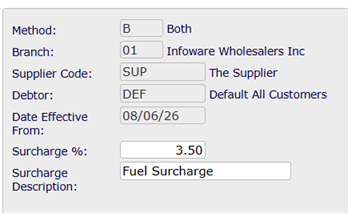
This means you can manage:
- Different surcharge rates by supplier
- Effective dates for rate changes
- Historical rates for audit and review
- Customer-level overrides where special arrangements apply
When a supplier changes their fuel surcharge rate, you update one record.
Infoware then automatically applies the correct rate to new customer orders from the effective date.
- No mass price update.
- No spreadsheet.
- No manual recalculation.
- Next to no effort.
3. Recover the Cost Automatically on Customer Orders
Your base purchase prices do not change. Your standard base, special and contract sell prices do not need to change.
Instead, when a customer order or quote is raised, Infoware automatically calculates the adjusted sell price using the current supplier fuel surcharge rate.
This means your team continues entering orders as normal, while Infoware adds the surcharge recovery to sell price.
The result:
- The correct recovery rate is applied every time
- Supplier changes take effect immediately on new orders based on effective date
- Staff do not need to manually calculate the surcharge
- Contract and standard pricing structures remain intact
- Margin is protected without a major repricing exercise
4. Report Fuel Surcharge Recovery in Daily GP
Recovering fuel surcharges increases sales and affects gross profit, so Infoware now provides visibility in the Daily GP app.
The report shows:
The report shows:
- Total sales and gross profit as normal
- Fuel surcharge recovered from customers
- Actual fuel surcharge paid to suppliers
- Net recovery position
- True daily gross profit % after surcharge activity
This gives management a clear answer to a critical question:
Are you recovering the fuel surcharge — or are you absorbing it?

Do Not Let Fuel Surcharges Become a Hidden Margin Leak
Fuel surcharges are likely to become more common, more variable, and more difficult to manage manually.
If suppliers are adding 2–3% to your invoices and you are not recovering it, that cost is coming directly off bottom line profit.
Infoware’s new fuel surcharge management helps you:
- Track supplier surcharge costs
- Recover surcharge costs automatically from customers
- Protect gross margin
- Reduce manual administration
- Maintain pricing integrity
- Report the true impact on daily GP
If your suppliers are adding fuel surcharges, now is the time to make sure you are ready.
Please contact Infoware to discuss activating fuel surcharge management for your business.
 Drag n Drop: 10x Quicker