
Visibility From Customer Order Fulfilment, Invoicing, to Delivery
“Simply brilliant! 10× quicker – what took me 30 minutes to plan a run with 30–40 orders now takes 3 minutes in infoware.”
— Shlomo Levin, Operations, NSW Liquor Logistics
IN SHORT: Infoware’s Run Planner
- Single, real-time source of truth for every order from creation through picking, loading, delivery, and invoicing.
- Automated credit checks with stop‑credit quarantine so risky orders are visible but held until cleared.
- Flexible picking options: discrete or wave picking, across paper, RF scanner or tablet-based workflows, so you can evolve processes without changing systems. All current and prior unpicked orders grouped into delivery runs, with automatic suburb / street / street‑number sequencing for efficient routing.
- Fast adjustments using drag‑and‑drop, move up / move down controls, and bulk moves of orders between runs or pick dates, allowing you to react to late orders or capacity changes in seconds.
- Quick pallet allocation and reverse drop‑sequence loading to make drivers’ runs smoother, faster, and more predictable.
- On time delivery with single‑click generation of manifests, delivery dockets and invoices, with invoice copies in drop sequence and integrated proof‑of‑delivery tracking when connected to your Transport Management System.
- Automated oldest-stock enforcement and best-before-date alerts so your team always picks the right stock first, reducing waste and compliance risk.
When teams lack visibility across the fulfilment process, time is wasted and customers receive inconsistent answers about order status. That quickly leads to frustration and lost confidence.
Infoware’s Run Planner helps solve this by giving sales, customer service, warehouse, logistics, and finance teams access to the same real-time information in one shared system — a single source of truth.
What is a Run Planner?
“Whitehouse has grown by 20 – 30% each year since Infoware was installed in 2019. A large part of the sustained growth is the management and visibility of orders on the Run Planner. Sales staff can see what is happening with orders when talking to customers. Repair orders appear separately from sales orders and are managed by a different team. We can toggle on and off to see progress of sales orders or repair orders or both as we want to.“
– Nathan, Director of Whitehouse Cleaning Supplies and Equipment
Infoware’s Run Planner is a real‑time, interactive control centre for your orders, tracking each one from creation through picking, manifesting, delivery and invoicing in a single, integrated view.
A common challenge for wholesalers and 3PLs is managing picking and dispatch efficiently across multiple daily runs. Whether your teams pick by paper, scanner or tablet, the Run Planner presents all current and prior unpicked orders in one place and groups them into delivery runs so nothing is overlooked.
Runs can be automatically sequenced into a practical default drop order by suburb, street and street number, then quickly fine‑tuned using drag‑and‑drop reordering or simple move up / move down controls. You decide which orders are picked discretely and which are wave picked, and orders on stop‑credit stay visible but quarantined until released. As orders move through the logistics process they change colour—from received through picking, manifesting and delivery—giving every team a clear, real‑time view of progress at a glance.
Subtle but important efficiencies are built in. With a single click you can generate manifest summaries and invoice copies in drop sequence for drivers, and optionally email invoices directly to customers before delivery. Fast pallet allocation and inline movement of orders between runs or pick dates let you rebalance loads or add late orders in seconds. Together, these capabilities help warehouse and logistics teams save substantial time each day while improving control, responsiveness and customer service.
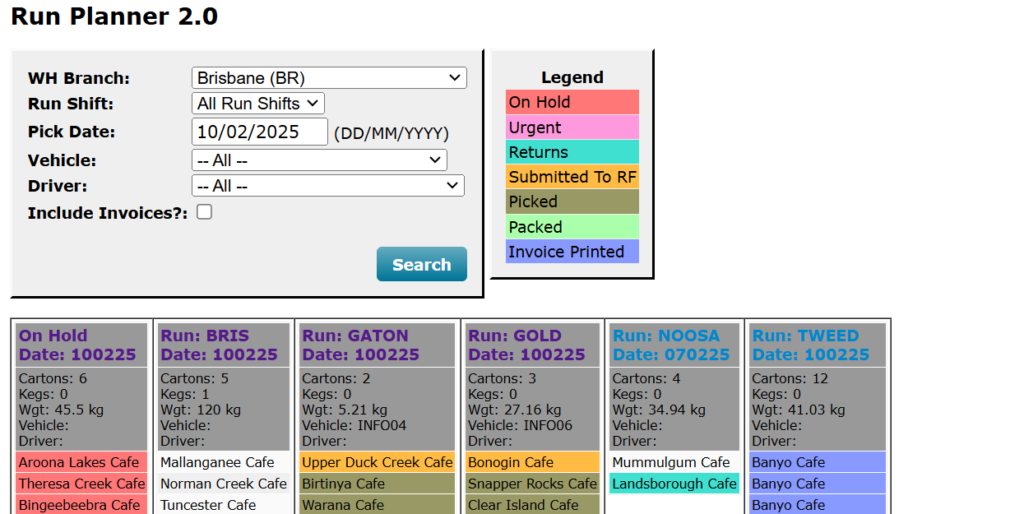
Once an order has been created, it immediately appears in the Run Planner ready to be actioned, with load weights automatically calculated. Order statuses and colours update automatically as they move from received, to submitted for picking, picked, loaded, delivered, then invoiced. You can plan delivery runs and manage the entire process from one central place.
Customers change their minds—so the system lets you accommodate that without losing control. With Infoware you can change an order up until it is manifested for shipping, removing artificial roadblocks and helping your customers run their businesses more effectively while your team stays in sync.
Real-Time Visibility in Practice
Operations teams using Run Planner often move from low visibility to a fully transparent environment where every room, zone, and run is visible without physically walking the floor. One operations manager described how their team no longer had to “go to each room” to see what was happening because the Run Planner showed activity and status in real time.
Similarly, sales teams gain confidence when talking to customers because they can see exactly what is happening with each order. For example, sales staff can distinguish between sales orders and repair orders with a simple toggle, allowing different teams to manage different order types while still sharing the same platform.
Credit Control
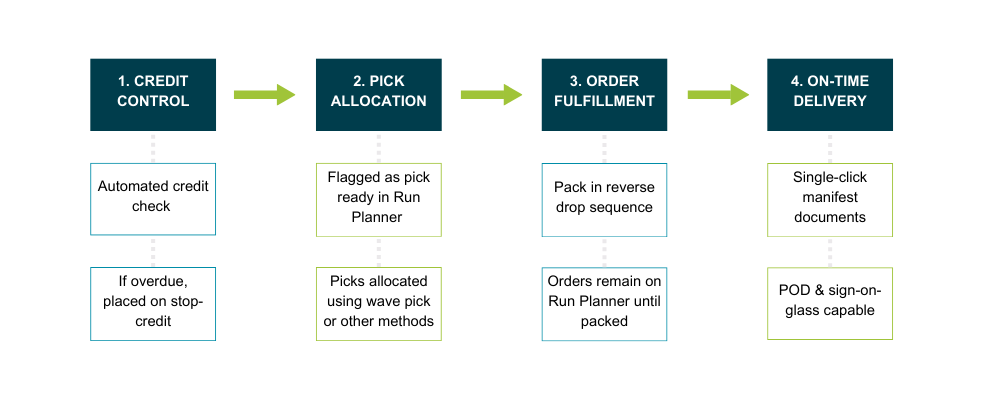
Infoware helps you protect cash flow without slowing down order capture. When a customer is put on stop‑credit, your team can still accept orders, but those orders are automatically quarantined and highlighted—typically in red—on the Run Planner. This makes it immediately obvious that the customer’s account must be brought up to date before the order can proceed to picking.
Because these quarantined orders remain visible in the same interface, there is no risk of them being forgotten. As soon as the customer pays and credit is released, the orders can seamlessly move into the picking workflow, avoiding rekeying or duplicated effort
Pick Allocation
Once an order passes automated credit checks, it appears in the Run Planner as ready for picking. Supervisors decide when to start picking and whether to pick orders individually (discrete picking) or through consolidated wave picking to increase efficiency.
Freight labels can be printed for wave picks, immediately assigning picked stock to the correct customer order and carrier. Infoware supports RF scanning so operators can scan bin locations, product barcodes, and pallets to ensure that the right products are picked for the right orders every time. For wholesale operations, backorders are included in picking requirements so they can be consolidated with existing orders, reducing the number of deliveries and lowering transport costs.
A key advantage is that run planning and picking do not need to happen in a strict sequence. While warehouse staff are physically picking released orders, your logistics team can continue refining other runs: adding late orders, rebalancing loads between vehicles, or planning future days’ runs in parallel. This removes a common dispatch bottleneck in high‑volume environments working to tight cut‑off times.
RF-Enabled Picking
For operations that need the highest levels of stock accuracy, Infoware supports full RF barcode scanning integrated directly into the Run Planner workflow. Rather than relying on paper pick lists or manual confirmation, operators use handheld RF scanners to scan bin locations, product barcodes, and pallets in real time, giving the system a verified, scan-by-scan record of exactly what was picked, from where, and for which order.
RF scanning in Infoware covers the full range of warehouse movements — not just picking. It can be applied across stock receipts, replenishments, and stocktake as well, meaning your inventory data stays accurate at every point stock changes hands, not just at the point of dispatch.
Wave picking is fully supported with RF scanning. Freight labels can be printed for wave picks to immediately assign consolidated stock to the correct customer order and carrier, and carton repack — including while a wave pick is still in progress — is also supported for operations that need that flexibility.
For operations handling serialised stock, individual pallets, bales, or product tracked at carton level (such as meat or temperature-sensitive goods), Infoware supports tally scanning. Cartons are scanned onto a pallet when received, and each pallet carries its full tally scan summary from that point forward. When the pallet is moved or dispatched, every carton detail travels with it — each carton is physically handled only once but remains fully accounted for in dispatch and container weights throughout.
Infoware also handles multiple barcodes for the same product code, removing the frustration of supplier barcode inconsistencies that can cause mismatch errors in less flexible systems.
It’s worth noting that RF scanning is an optional capability, recommended where it genuinely adds value to your operation. Many Infoware clients run efficient, accurate warehouses using Infoware’s location management system without RF scanning. The right approach depends on your volume, product type, and accuracy requirements — and Infoware’s team can help you work out which suits your operation best.
Stock Accuracy and Best Before Date Management
Picking the wrong stock — whether the wrong product, wrong quantity, or wrong age — is one of the most costly errors a wholesale or 3PL operation can make. Infoware addresses this in two ways built directly into the picking workflow.
First, Infoware can enforce oldest-stock-first picking by default. Rather than relying on operators to remember rotation rules, the system guides pickers to the correct stock age automatically, reducing both picking errors and the risk of stock going out of date before it leaves the warehouse.
Second, Infoware generates automated red and amber alerts on products as they approach their best before date. These alerts give warehouse and operations teams advance warning so action can be taken — whether that’s prioritising affected stock in upcoming picks, flagging it for a sales team follow-up, or quarantining it for review. For businesses in food, beverage, cold storage, or any perishable category, this is a significant compliance and waste-reduction capability that sits quietly in the background, running automatically.
Order Fulfillment and Run Optimisation
Any orders not picked remain visible on the Run Planner until they are picked or cancelled, so nothing slips through the cracks. The Run Planner offers flexible tools to set up and manage delivery runs, typically by region or run code, with orders automatically sequenced into a practical default drop order by suburb, street, and street number.
Drivers’ days become smoother because orders can be packed and loaded in reverse drop sequence. This means that the last delivery is loaded first and the first delivery is loaded last, reducing the time drivers spend searching for cartons at each drop. When changes are needed—such as inserting a late order, reassigning a stop to another truck, or balancing loads—dispatchers simply drag and drop orders or use move up / move down controls. They can also block move one or more orders to a different run or pick date in seconds to handle late changes.
Load weights, carton totals, and drop counts are automatically calculated and remain visible per vehicle and per run. This helps avoid overloading, improves route planning, and provides the data needed to make better decisions about capacity and fleet utilisation. Pallet preparation is also streamlined: rather than assigning pallet numbers one order at a time, staff can define pallet breaks in the Run Planner and build pallets in reverse drop sequence for faster unloading.
Drag-and-Drop Run Planning
Planning a delivery run should not start with manual sorting. Infoware’s Run Planner now automatically sequences orders within each run by suburb, then street, then street number, giving dispatch staff a sensible default drop order as soon as the run is opened. Instead of building the route from scratch each morning, your team can start from a practical sequence and simply fine-tune where needed.
When changes are needed, dispatchers can instantly adjust the order of stops using drag-and-drop controls or quick move up / move down buttons on each row. For larger changes, one or more orders can also be block moved to a different run or pick date in seconds, making it easier to handle late orders, customer delivery windows, overloaded vehicles, or last-minute load balancing.
This matters because the time saving is material. Infoware cites a customer example where planning a run with 30–40 orders dropped from 30 minutes to 3 minutes after these run planning improvements were introduced
Quick Pallet Allocation
Once the run sequence is finalised, Infoware’s Quick Pallet Allocation makes pallet setup much faster. Instead of assigning pallet numbers to each order individually, staff can simply identify the first order for each pallet break and let the system assign that pallet number from that point onward. In a busy wholesale or 3PL environment, that turns a repetitive admin task into a much faster planning step.
This also supports better loading discipline. Because pallets can be built in reverse drop sequence, the final delivery goes on first and the first delivery goes on last, making unloading quicker and reducing time spent searching for cartons at each stop. For operations running multi-drop routes every day, this helps connect planning, palletising and delivery into one smoother flow.
On-time Delivery
With a single click, you can generate manifests, delivery dockets, and invoices for an entire run. Manifest summaries and invoice copies are produced in drop sequence for drivers, and invoices can optionally be emailed directly to customers before the driver arrives on site. This reduces paperwork at the delivery point and speeds up the proof-of-delivery and invoicing cycle.
Once drivers are on the road, they follow loads that have already been organised in run sequence, helping them deliver more efficiently and with less stress. This improves their ability to interact professionally with your customers’ receiving personnel and reduces mis-deliveries.
When your Transport Management System is integrated with Infoware, you can track deliveries right through to the last mile. Proof of Delivery can be captured via “sign on glass” devices and delivery photos, closing the loop back into the Run Planner so that customer service, accounts, and management all see delivery status in the same place. Once a delivery is confirmed, the corresponding order in the Run Planner automatically turns green, giving your entire team an instant, at-a-glance confirmation that the job is done — no phone calls required.
Ready for a no-commitment personalised review?
Get a personalised review of how effective your current system is supporting your operational processes.
The initial exploratory chat will take 10-15 minutes . Yes, this and subsequent more detailed sessions on how infoware can help you are free. We will utilise our 35+ years of experience in delivering process improvements to wholesalers to help you understand where your current operational capabilities are, and where you can take them.
- Free order-to-delivery operational process review
- Audit of your current systems capability and any gaps you may want to evaluate
- A concise report of our recommendations
To identify how you can get more out of your operational processes, request your no commitment review below, or give the Infoware team a call on 1300 463 692.
Infoware is designed to support Australian wholesalers
Infoware is your Australian based software partner with tech support direct from the people who know the product, during Aussie friendly work hours.
We partner with you to get your Inventory Management System setup to maximise productivity from day one with ongoing support when required.
Learn exactly how Infoware will help your operation by booking a review of your specific needs and pain points. Then we can demonstrate Infoware focused specifically on the benefits to your business below.
Take a look at all the ways Infoware will benefit your business >